
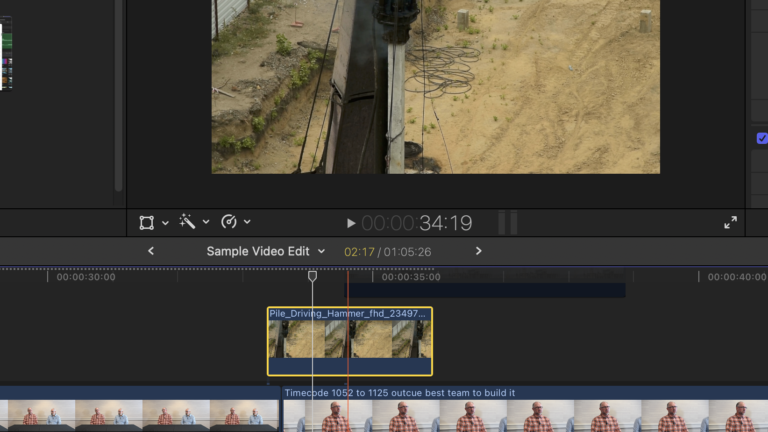
In today’s attention economy, a big premium is put on pattern-interruption. A video that makes people stop their scrolling is worth its weight in gold. In today’s video producer’s training guide, we explore the ultimate interrupter within your video edits. The NATPop, or a natural pop of sound paired with b-roll, is a powerful maneuver.
What Is a Nat Pop and Why Your Video Needs It
If you want to keep your viewers hooked, you must master the art of the pattern interrupter. In professional video editing, a “nat pop” (natural sound pop) is a short, distinct burst of ambient audio used to break up the monotony of continuous dialogue or a standard talking head video. Imagine an interview where a spokesperson talks continuously for a few minutes. Even if the information is highly engaging, the single, unvarying tone of a human voice can quickly cause an audience to tune out. A nat pop acts as a dynamic ingredient in your editing workflow. By strategically cutting away from the interview to insert a brief, authentic sound effect—like the sudden rev of a construction drill, the roar of a crowd, or the click of a camera—you instantly capture attention and inject fresh energy into your content.

Seamlessly Bridging Thoughts with Assemble Editing
When you are building a documentary-style marketing video, you will frequently rely on an assemble edit. This foundational technique involves taking separate blocks of picture and sound from different parts of an interview and placing them right next to each other on your timeline. For example, you might choose to join a great thought from the ten-minute mark of your footage directly to another excellent point made at the eleven-minute mark. Because these moments were recorded at different times, the speaker’s facial expressions and body language will naturally jump and look disjointed. Professional video editors easily bridge this visual gap by overlaying relevant B-roll footage over the cut. However, the real magic happens when you pair that physical B-roll clip with an independent natural sound effect, marrying the audio and visuals perfectly to hide the edit and transition smoothly between thoughts.
“Audio Leads Video” Technique Adds Ultimate Flow
To make your video edits feel polished and truly broadcast-quality, you should always design your transitions so that your audio leads your video. This means that your audience should hear the subtle beginning of the oncoming natural sound pop a second or two before the corresponding B-roll clip actually appears on the screen. In your editing software, you can achieve this by manually blending the ambient room tone and gently fading up the volume of your secondary sound effect. Keep a close eye on your audio meters; while your main dialogue should remain crisp and dominant, your background nat pop tracks should generally sit lower, at around one-quarter or one-fifth of the main volume. Carefully fading your sound effects in and out allows you to stitch entirely different pieces of stock footage together seamlessly, creating a professional, layered story that keeps your niche audience fully immersed.


